AI-first home inspection platform

Write the report
before you leave.

Tap through your template. AI turns your notes into finished narrative. The client gets the branded report the same day — not three days later.

No credit cardiOS + webWorks offlineCancel anytime
specmind.ai/report/live-demolive
1You type rough field notes
water stains basement ceiling under bathroom plumbing leak
AI ENHANCES
2SpecMind writes the finding
SPECMIND AIWater staining was observed on the basement ceiling directly beneath the second-floor bathroom, indicative of an active or historical plumbing leak. Recommend evaluation and repair by a licensed plumber prior to closing.
⚠ Major ConcernPlumbing
Built for the working inspector.
Priced so you keep the revenue you earn.
5free
Reports to start — no credit card
2h
Average report turnaround
13
Branded email + PDF templates
100%
Works offline in the field
The problem Report writing

The inspection takes four hours. The report takes three more.

You bill for the inspection. You don’t bill for the evening of typing.

SpecMind removes everything below the dotted line: the report is written on-site, mostly by tapping.
Billed
  • 8:05aArrive on site

    Meet the buyer and their agent.

  • 8:20aRoof, exterior, crawl space

    Two hundred photos.

  • 12:30pInspection done

    On-site work finished.

Unpaid
  • 7:40pOpen the laptop at home
  • 9:15pRetype the same paragraphs as last week
  • 10:47pSend the report

    The agent already asked twice.

The product Real screenshots, no mockups

This is SpecMind.

Every screenshot below is the live product, exactly as it ships.

Write the report

A three-pane editor: sections on the left, items in the middle, answers on the right. Most items are answered by tapping, not typing.

  • Required and critical completion tracked live, per section and for the whole report
  • AI turns your field notes into professional narrative — you approve every word
  • Generate and publish the PDF from the same screen
web.specmind.ai/reports
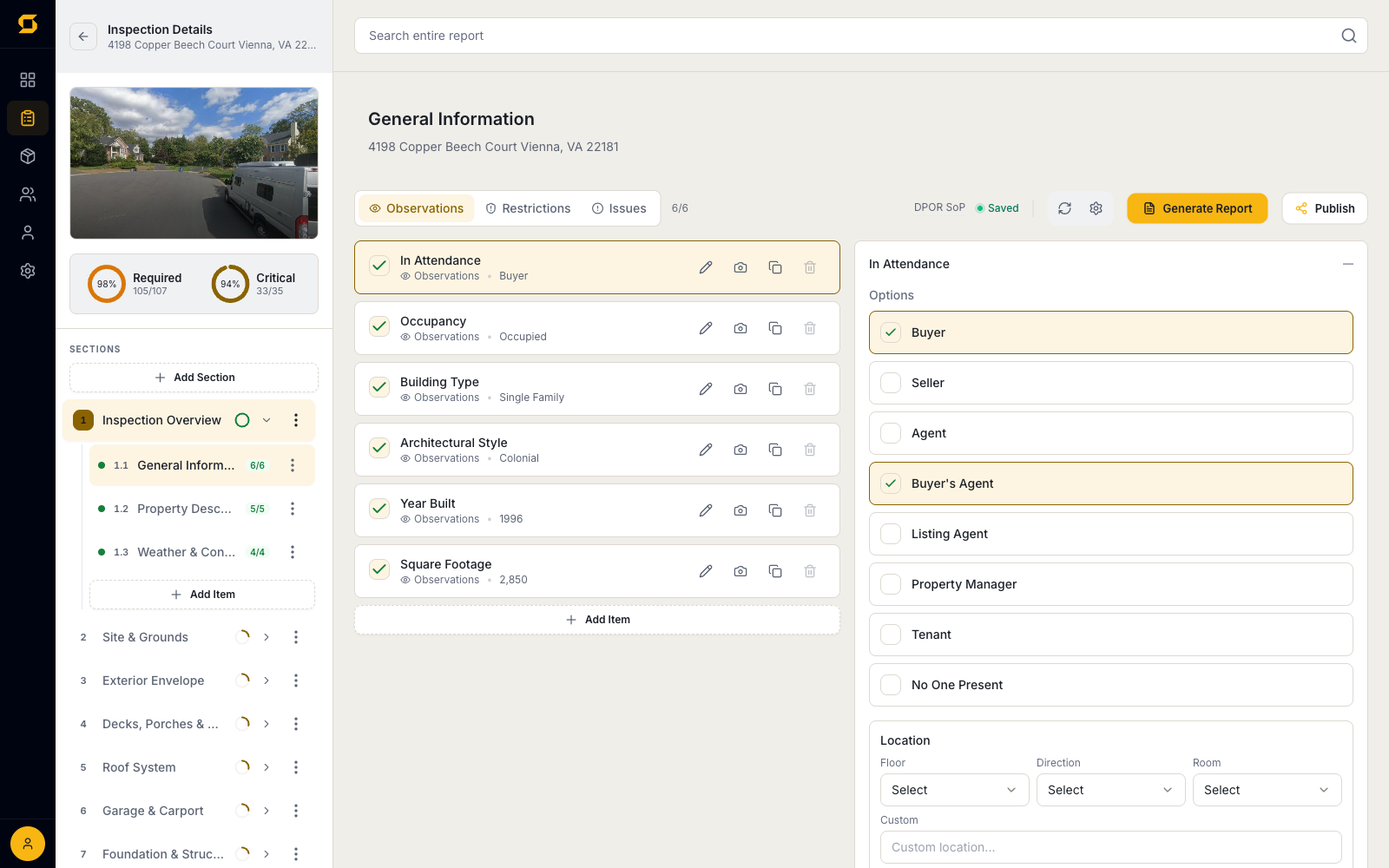
SpecMind report editor with section navigation, completion tracking, and tap-to-answer items

Run the job from one page

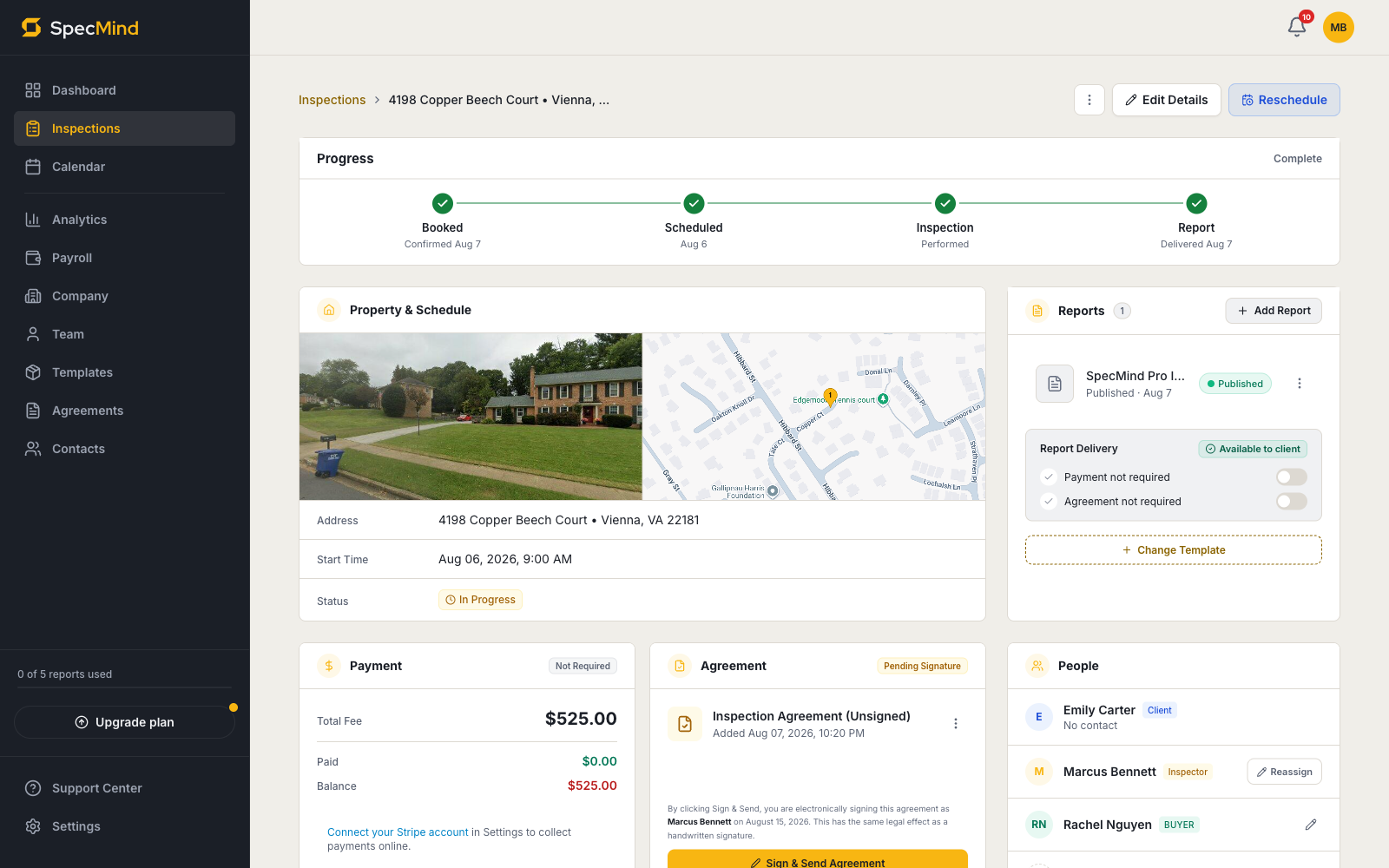
Every inspection has a single page with everything on it. No hunting through menus.

  • Booked → scheduled → inspected → published, tracked on one progress bar
  • Street View and map load automatically from the address
  • Payment status, agreement signature, and every contact on the job — same page
web.specmind.ai/inspections/…
SpecMind inspection page with progress stepper, property map, payment, and agreement status

See every job's status

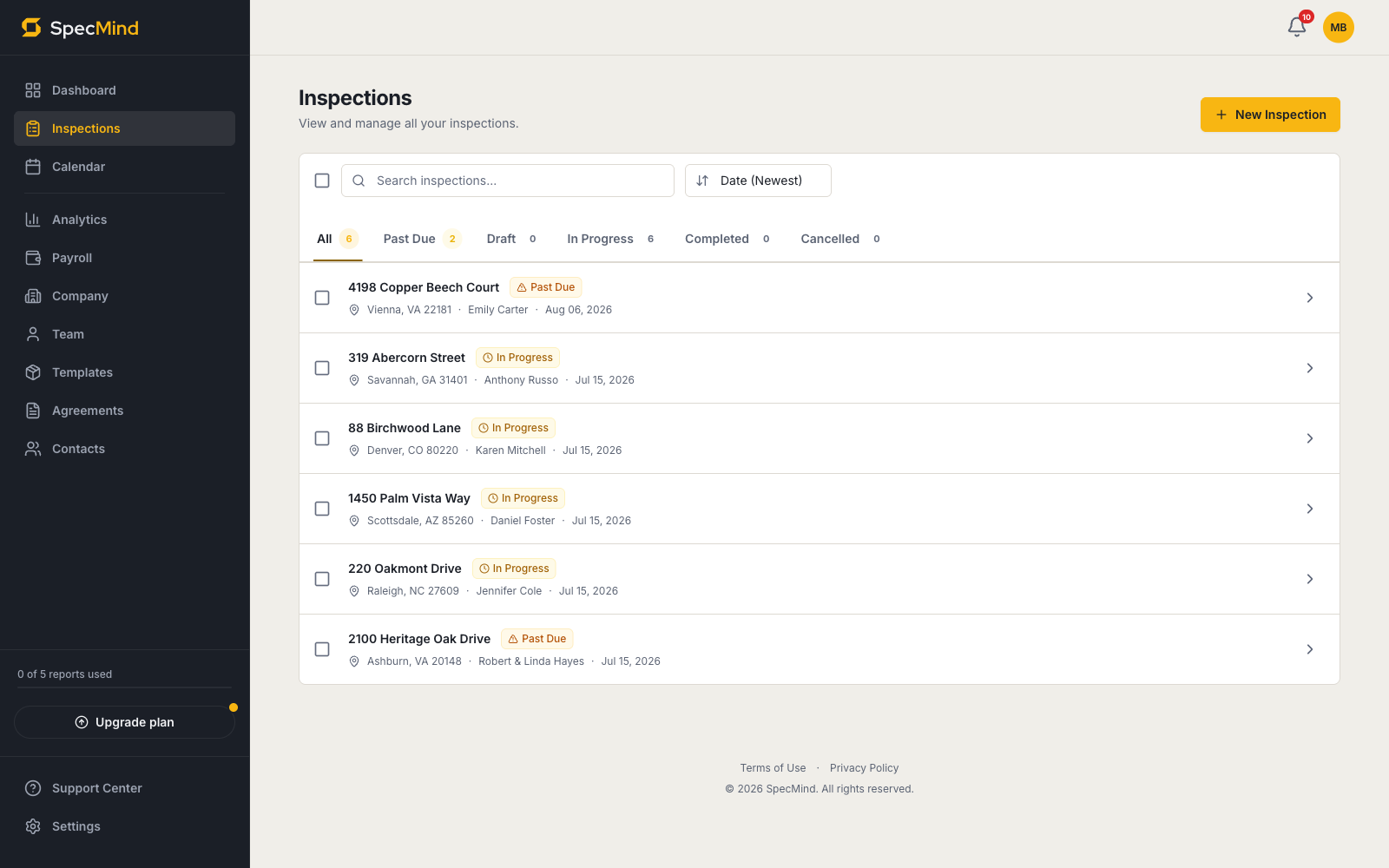
One list, filtered by where each job actually is.

  • Tabs for past due, draft, in progress, completed, and cancelled
  • Search and sort across every inspection you've ever done
  • Click any row to land on that job's page
web.specmind.ai/inspections
SpecMind inspections list with status tabs and search

Start from a real template library

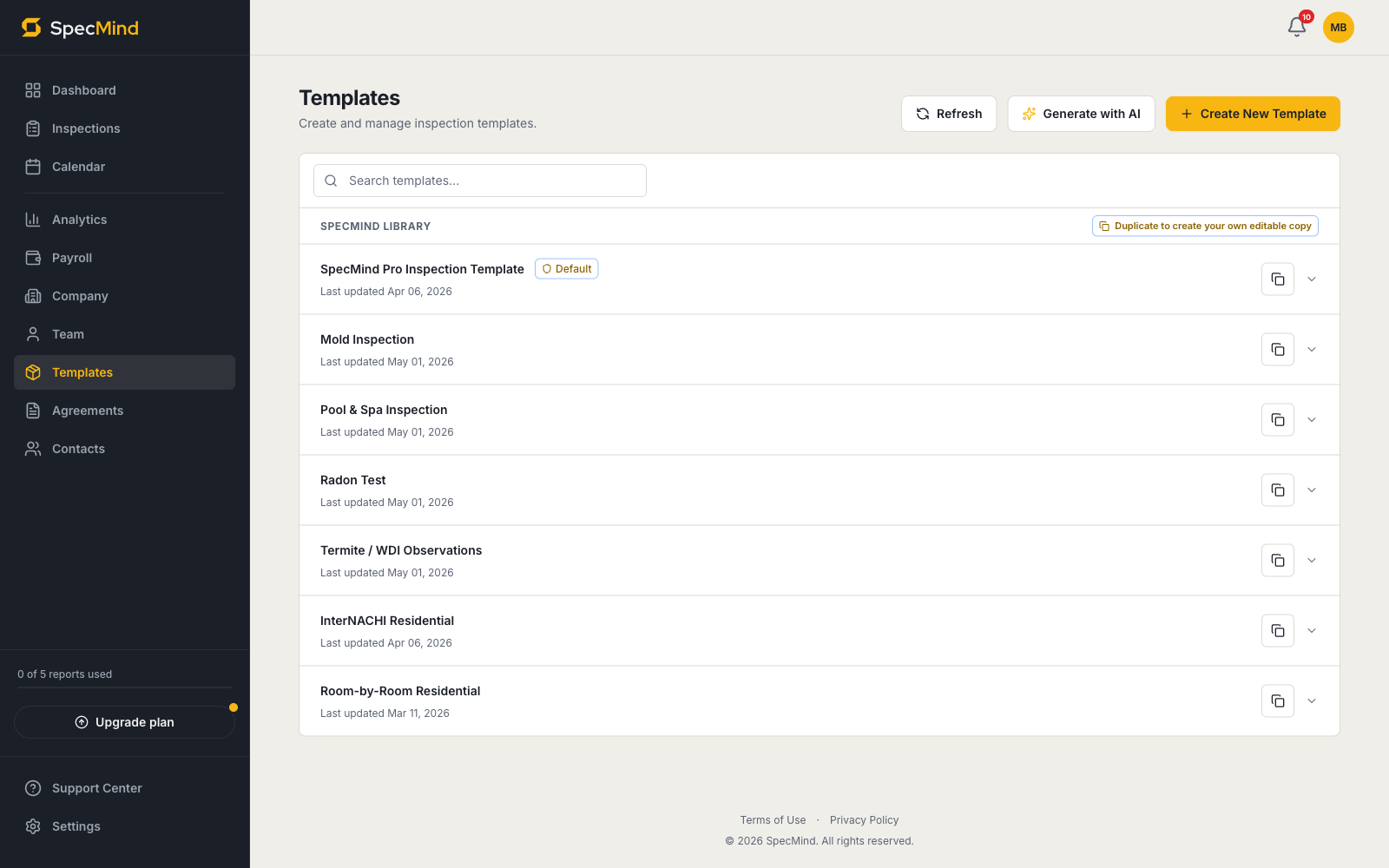
Included with every account: SpecMind Pro, InterNACHI Residential, Mold, Pool & Spa, Radon, Termite/WDI, and Room-by-Room.

  • Duplicate any library template and edit every section, item, and comment
  • Or describe the inspection type and let AI generate a template
  • Share templates across your whole company
web.specmind.ai/templates
SpecMind template library with built-in templates and AI generation

Price your services once

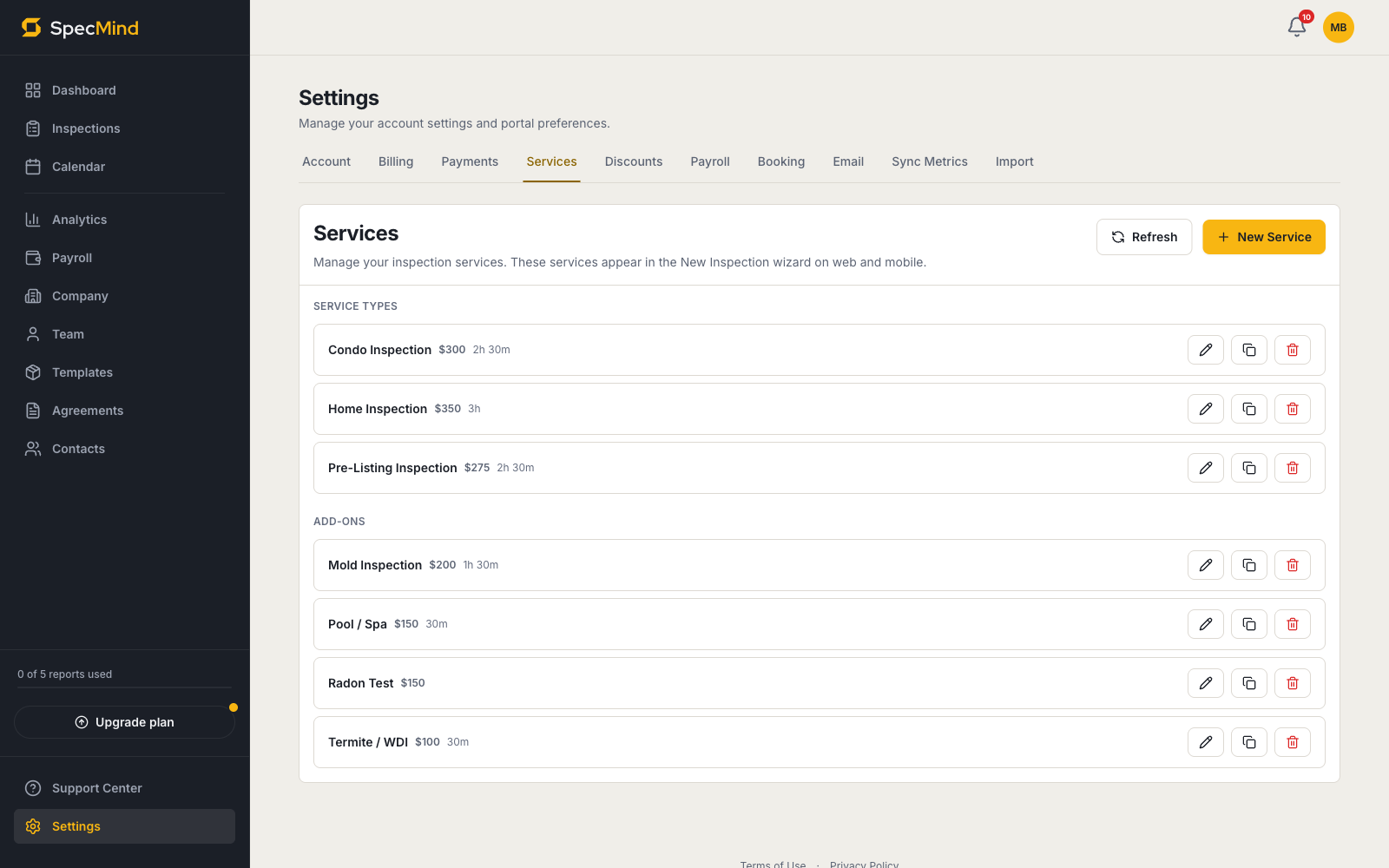
Set your services, fees, and durations. They flow into the new-inspection wizard, invoices, and online booking automatically.

  • Primary services and add-ons, each with its own fee and duration
  • Per-square-foot pricing with an included-sqft threshold, if that's how you charge
  • The price auto-fills from the property's actual square footage
web.specmind.ai/settings/services
SpecMind services settings with per-service pricing and durations
The deliverable Not a mockup — a real report

The report your client actually opens.

Summary-first, branded, and delivered through the client portal — these are live SpecMind reports, not screenshots. Switch templates and scroll through a real one.

portal.specmind.ai/r/bd50000993e7

Live report · Home Inspection · Ashburn, VA. Generated in SpecMind and shared exactly as a client receives it.

Open this report in a new tab
The platform one plan set, 27 features

The whole platform, drawn to plan.

Three sheets, one for each part of the job. Everything on them ships on every plan — including the free one.

The AI does the writing. You do the inspecting.

Every AI feature is optional and reviewable — nothing ships without your approval.

01

AI Narrative Writing

Turns brief field notes into professional report narrative. You review and approve every word before it reaches the report.

02

AI Comment Generation

Describe a finding in one line — it writes the full comment, assigns the severity, and files it in the right section.

03

SnapLog

Log a finding in one line the moment you spot it. SnapLog classifies it, assigns the severity, and files it in the right section.

04

AI Template Generator

Describe the inspection type and get a complete, editable template — sections, items, and comments included.

05

AI Watch List

Trouble spots flagged before you arrive, generated from the property's age, size, and records — so you know where to look first.

06

Pre-Departure Checklist

A generated list of physical-world reminders — breakers, valves, hatches — before you leave the property.

Sheet 1 of 3 — all 27 features included in every plan

The AI Built in, not bolted on

The AI writes the report.
You inspect the house.

SpecMind was designed around AI from day one. The model turns your field notes into professional inspection language — standards-aware, at the severity you choose — not a stranger’s boilerplate.

Four ways the model earns its keep every inspection.

Grounded in inspection narratives and the plain-English severity language buyers, agents, and underwriters actually trust.

  • Comment enhancement

    Type rough notes. Get professional inspection language back — at the severity and section you're working in.

  • Voice & quick-log

    Describe a finding out loud. AI classifies severity, picks the section, and writes the comment.

  • Property intelligence

    Auto-fills property details from public data. Flags age-related issues before you arrive on-site.

  • Before-you-leave checklist

    A punch list of what to verify before you drive away. Never miss a crawl space again.

01 / 04
→ Field notes
corroded copper supply line under kitchen sink, slow drip
↓ SpecMind output
Active leak observed at the corroded copper supply line beneath the kitchen sink. Corrosion of this nature typically indicates aged galvanic interaction or poor water chemistry; replacement is recommended to prevent future failure and water damage.
⚠ Major ConcernPlumbing › Supply Lines
Try it Your note, our AI, right now

Type a rough note.
Watch it become a finding.

This is the real SpecMind AI — the same model that writes in the app. Describe something you’d see on an inspection and see what comes back. Inspection notes only, please.

Try:
The workflow Up and running today

Three steps. Ten minutes.
Then forget you switched.

No onboarding calls. No fourteen-page migration checklist. No discovery call with our team. Sign up, import your templates, run your next inspection.

Ⅰ Step one

Create your account.

Set your company name and services. Pick a starter template or upload your own. Invite your team. Free trial activates instantly — no credit card.

≈ 10 minutes
Ⅱ Step two

Run an inspection.

Open the mobile app on-site. Capture photos, dictate notes, let the AI draft comments as you go. Works fully offline in basements, attics, and crawl spaces.

In the field
Ⅲ Step three

Deliver the report.

One tap to render a branded PDF. Send it through the client portal with a payment link attached. Get paid before they finish reading it.

≈ 30 seconds
The price Honest and posted

One plan, priced per inspector.
Pay monthly or save with annual.

Start free with 5 published reports. Upgrade to Pro when you need unlimited. Team features — calendar, payroll splits, shared templates — are included at no extra per-seat charge.

Monthly

No commitment
Pro

Everything you need — solo or team

$79.99/ inspector / month
  • Unlimited inspections
  • Multi-device sync
  • Offline mode
  • Snaplog voice capture
  • AI-powered comments
  • Automatic property details
  • Pre-departure checklist
  • AI template generator
  • Custom templates
  • Shared templates
  • PDF report import
  • Photo annotation
  • Branded reports
  • Multiple reports per inspection
  • Client portal
  • Payments & invoicing
  • Online scheduler
  • Team calendar
  • Multi-inspector assignments
  • Inspector management
  • Service area routing
  • Payroll & splits
Start free — Monthly

Yearly

Best Value
Pro

Everything you need — solo or team

$959.88$799.99/ inspector / year

Pay for 10 months, get 12. That's $159.89 back in your pocket.

  • Unlimited inspections
  • Multi-device sync
  • Offline mode
  • Snaplog voice capture
  • AI-powered comments
  • Automatic property details
  • Pre-departure checklist
  • AI template generator
  • Custom templates
  • Shared templates
  • PDF report import
  • Photo annotation
  • Branded reports
  • Multiple reports per inspection
  • Client portal
  • Payments & invoicing
  • Online scheduler
  • Team calendar
  • Multi-inspector assignments
  • Inspector management
  • Service area routing
  • Payroll & splits
Start free — Yearly

Prices in USD. Your first 5 reports are free — no credit card, no time limit. Paid plans renew automatically (monthly or yearly, as selected) until cancelled; cancel anytime in Settings → Billing. Past reports stay viewable forever — we never hold data hostage.

FAQ The honest answers

Questions you’d actually ask.

Can I migrate my existing templates and comment library?

Yes. Bring your templates, comment libraries, logo, and email signatures. Sections and items map one-to-one to SpecMind's structure, so your inspectors feel at home by the first job. We'll help you import historical reports too if you need that.

Is the AI actually good, or is it a marketing wrapper?

It turns your field notes into report-ready language. Type something like "water stains basement ceiling," pick the comment category, and you'll get back professional inspection wording at the right severity for the section you're on. It writes the formal sentence from your observation — a speed multiplier, not a substitute for your judgment.

Does the mobile app work offline in attics and crawl spaces?

Fully. Inspect anywhere — zero bars, airplane mode, doesn't matter. Capture photos, dictate notes, complete sections, fill out the entire report. Everything syncs the moment you're back in range.

What does the free tier actually include?

Five published reports, no credit card required, full access to report delivery, the branded PDF export, and the client portal. It's enough to run real jobs and judge the tool on your own work — not a crippled demo.

How does team pricing work if I add inspectors?

$79.99 per inspector per month, or $799.99 per inspector per year. Office staff and admin accounts don't count against seats. No separate tier for analytics, payroll splits, or shared templates — every Pro plan includes every feature.

Can clients still view past reports if I cancel?

Always. We never hold past data hostage. Reports stay viewable and downloadable, and you can re-activate Pro any time to create new ones. "Never hold data hostage" is a brand rule, not a marketing line.

Stop writing reports at midnight.

Five reports free. No credit card. Your first branded, AI-assisted report goes out today.

No card · No call · No pressure